

Accessing an online casino account ought to be simple, yet many Australian players encounter needless problems that hinder access or even shut them out. At Casino Kingdom, the login and registration journey is built with well-defined steps, but small mistakes in password handling, device settings or verification documents can still create frustration. Recognizing these common mistakes helps you go through the process smoothly, secure your account and experience continuous play. This guide walks through the exact points where players often stumble and demonstrates you how to prevent them on your first or next visit.
Mishandling
When you forget your password, the recovery link is sent to the registered email address, yet players sometimes search the spam folder too late or request multiple resets in quick succession. Each reset invalidates the previous link, so the inbox can fill with expired tokens. Waiting five minutes after the first request, then checking both inbox and junk folders, ensures you click the active link and complete the process in one attempt.
Using an Old Email Address You Can No Longer Access
During sign-up many users enter a secondary email they rarely check, only to discover it has been deactivated by the provider. Casino Kingdom allows you to update the email address in the account settings, but you must first verify the new address by clicking a confirmation link. Keeping the primary email current and confirming the change before you need password recovery prevents a lengthy support ticket when you are locked out.
Why Secure Login Matters for Australian Players
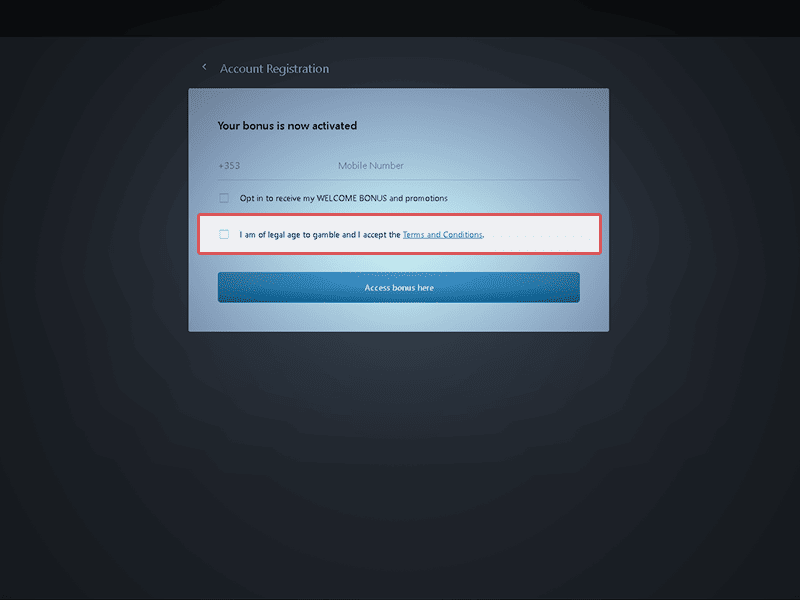
Australian online casino users encounter extra scrutiny because local banking rules and strict identity checks are established to prevent fraud. When you create an account at Casino Kingdom, the system logs every login attempt, device fingerprint and IP address so that suspicious activity can be identified quickly. A single mistyped password or an outdated browser setting can lead to a temporary lock, compelling you to complete extra verification steps before you recover access. Taking the time to grasp these safeguards means fewer interruptions when you want to deposit or withdraw, and it ensures your personal and banking details safer in the long run.
Overlooking Two-Factor Authentication Setup
Once the initial login completes, the next screen asks you to activate two-factor authentication, yet many users select “remind me later” and never come back to the setting. for more Without 2FA, a compromised password is all an attacker requires to drain your balance or change withdrawal details. Casino Kingdom supports authenticator apps that generate time-based codes, and the setup requires less than two minutes on your phone. Enabling this layer immediately after the first successful login eliminates the most common gap between registration and secure play.
Using SMS Instead of an Authenticator App
Some players favor SMS codes because they appear automatically, but text messages can be intercepted through SIM-swap attacks that have become more frequent in Australia. An authenticator app keeps the seed on your device and does not lean on the mobile network, making it harder for a remote attacker to steal the code. Casino Kingdom enables you to switch from SMS to app-based 2FA at any time in the security menu, and the switch activates on the next login attempt.
Failing to Identity Verification Promptly
Australian regulations require full KYC checks prior to any withdrawal processing, and Casino Kingdom shows a clear checklist when you hit a certain deposit threshold. Players often disregard the prompt and keep playing, just to be blocked when they eventually submit a payout. The checklist asks for a government-issued photo ID, a recent utility bill with your address, and at times a selfie holding the ID. Uploading clear, colour scans of these documents during the first week sidesteps last-minute delays when you want to cash out.
Submitting Blurry or Cropped ID Photos
Even when documents are submitted on time, poor image quality can lead to automatic rejection and require a resubmission. Casino Kingdom’s verification team wants every corner of the licence or passport showing, like the hologram and signature. Capturing the photo in bright, even light and against a plain background, then ensuring that the file size is under the stated megabyte limit, increases the chance of first-time approval.
Providing a Mistaken Username or Email Format
During registration you select either a username or you are given one based on your email address, yet players later try to log in with slight variations such as capital letters or extra dots. Casino Kingdom treats usernames as case-sensitive, so “JohnDoe87” and “johndoe87” are recognised as two different accounts. Recording the exact spelling immediately after registration, or copying it from the confirmation email, prevents this simple but surprisingly common error.
Picking a Weak or Recycled Password
Password security straight influences how rapidly your account can be reached after the first login. Casino Kingdom enforces a minimum length and a mix of uppercase letters, small letters, numbers and symbols, but the requirement on its own does not hinder players from repeating an old password from another site. A repeated password can be exposed in third-party breaches and then checked against your casino account within minutes. Generating a new, long passphrase that you have never utilized anywhere else, and keeping it in a reliable password manager, prevents this common and dangerous shortcut.
Saving Passwords in Browser Autofill Without Extra Protection
Browser-stored passwords are practical, yet they can be read by anyone who obtains physical access to your device or by malware that harvests saved credentials. Casino Kingdom’s login page offers the option to stay signed in, but that feature only operates securely on a private computer protected by disk encryption and up-to-date antivirus. On public or public machines, typing the password yourself each time and declining the browser prompt maintains the account separated from unauthorized eyes.
Omitting the Correct Sign-Up Sequence
Several players attempt to log in ahead of they have completed every field in the registration form, only to discover that their account is still labeled as incomplete. Casino Kingdom requires a full name, date of birth, residential address and a valid Australian mobile number during the initial sign-up, because these details flow directly into the later verification stage. If any item is absent or contains a typo, the system will not create login credentials and you will be requested to resubmit the form. Finishing the sequence in one sitting, double-checking each entry against your driver licence or passport, eliminates this first and most frequent hurdle.
Typing a Mobile Number That Cannot Receive SMS
Australian mobile numbers must be competent of receiving verification codes, yet players sometimes register with a VoIP service or an overseas SIM that blocks incoming texts. read this transmits a six-digit code to confirm the number belongs to you, and if the message never reaches the account lingers in limbo. Utilizing your everyday Australian handset and ensuring it is not set to spam-filter unknown senders fixes the issue before you even get to the login screen.
Overlooking Session Timeout and Numerous Device Logins
Casino Kingdom terminates a session after thirty minutes of inactivity to protect idle accounts, yet players often leave multiple tabs or devices signed in across home and work computers. When one session times out, the others may still remain active, causing confusion about which device contains the latest balance. Logging out from every device after each session, or using the “log out all devices” button in security settings, maintains your account state consistent and minimizes the risk of stale sessions being exploited.
Overlooking Device and Browser Compatibility
Login problems occasionally stem from old browsers or operating systems that no longer support the most recent security certificates. Casino Kingdom’s platform is checked on current versions of Chrome, Safari, Firefox and Edge, yet players on older software may see infinite loading spinners or certificate warnings. Upgrading your browser before endeavoring to log in, or moving to an incognito window to rule out extension conflicts, resolves most compatibility issues without getting in touch with support.
Permitting VPNs to Mask Your Location
Some Australian players utilize VPNs to access overseas betting markets, but the identical VPN can mark the login as suspicious when the IP unexpectedly jumps from Sydney to Amsterdam. Casino Kingdom matches the registered address with the IP used at login, and multiple mismatches can cause manual review. Turning off the VPN or inserting Casino Kingdom’s domain to a split-tunnelling list keeps your session within predicted geographic parameters.
Ignoring Withdrawal Verification Requirements
Even after a successful login and deposit, Australian players must at times re-verify their identity before a withdrawal is approved. Casino Kingdom may request an additional utility bill dated within the last three months or a bank statement showing the same name and address used at registration. Organizing these documents in advance and storing them in a secure folder means you can respond to the request within minutes rather than days, maintaining your funds moving on schedule.
Final thoughts: Developing a Habit of Secure Entry
Every login at Casino Kingdom is an chance to bolster good security practices rather than a hurdle to surmount. By finalizing registration in complete, choosing a unique strong passcode, turning on app-based two-factor verification and keeping your verification papers ready, you erase the hassle that results in most account issues. When you view each stage as an element of a cohesive secure system, the process becomes second nature and the likelihood of being locked out decrease significantly. The outcome is faster access, easier withdrawals and increased peace of mind whenever you return to play.